


.avif)

What if your next major growth opportunity was already hidden inside your LinkedIn data?
For B2B marketers, LinkedIn is one of the most powerful and accurate data sources available today:
- With over 1.2 billion active professionals, LinkedIn offers self-reported, verified, and constantly updated insights into your ideal prospects, making it a goldmine for data-driven growth and sales intelligence.
- Unlike static databases, LinkedIn profiles are built and maintained by professionals themselves. Since launching its verification programme in 2024, over 80 million members have confirmed their identities, ensuring LinkedIn data maintains an exceptionally high level of authenticity and reliability.
- What sets LinkedIn apart is its self-regulating ecosystem: peer connections, company affiliations, and real-time engagement naturally keep information accurate and up to date. With more than 1 billion professionals frequently updating their profiles to reflect career moves, new ventures, or earned certifications, LinkedIn delivers fresh, dynamic insights that traditional databases simply can’t match.
Beyond accuracy, LinkedIn provides deep contextual data that empowers smarter market segmentation and personalization, including:
- Industry and company size
- Skills, endorsements, and professional interests
- Content engagement and activity
- Employment history and education
By tapping into these rich data layers, businesses can create more targeted campaigns, improve lead quality, and drive measurable B2B marketing growth.
Here we look at how you can extract LinkedIn data with Dux-Soup, allowing you to target your leads both on and off the platform. Our Head of Professional Services, Giles Garnett, covered this in a webinar - watch it here for live demos.
Extracting LinkedIn data the easy, and cost-effective way
Dux-Soup is a LinkedIn automation tool that can extract data from LinkedIn and download it to CSV from as little as $11.25/month for the Pro plan. Alternatively you can send the data straight to your CRM system from $41.25/month with the Turbo plan.
In this guide, we’ll show you how to extract LinkedIn data using Dux-Soup and use it to drive business growth in 2025.
What do you need to extract LinkedIn data?
You only need 2 tools to extract LinkedIn data:
- A LinkedIn account
- A Dux-Soup license
All of Dux-Soup’s plans (Pro, Turbo and Cloud) allow you to extract LinkedIn data and download it to CSV. Turbo and Cloud allow you to send the data to any third party tool - either through our native integrations, or via Zapier or Make.
If you’re looking to just download LinkedIn data to CSV, then start with our Pro plan. It also allows you to send personalized, automated connection invitations and follow-up messages. You can buy Pro here.
If you’re keen to also generate leads using LinkedIn (or send your LinkedIn data to another software platform) then our Turbo and Cloud plans offer multi-step outreach campaigns that can nurture prospects through to opportunities. Check out our Turbo and Cloud pricing.
What data can I extract from LinkedIn with Dux-Soup?
You can extract two different data sets from LinkedIn with Dux-Soup:
1. High-level ‘Scan’ data
2. More comprehensive ‘Visit’ data.
We compare the datasets below, showing the data fields you can extract with each option.
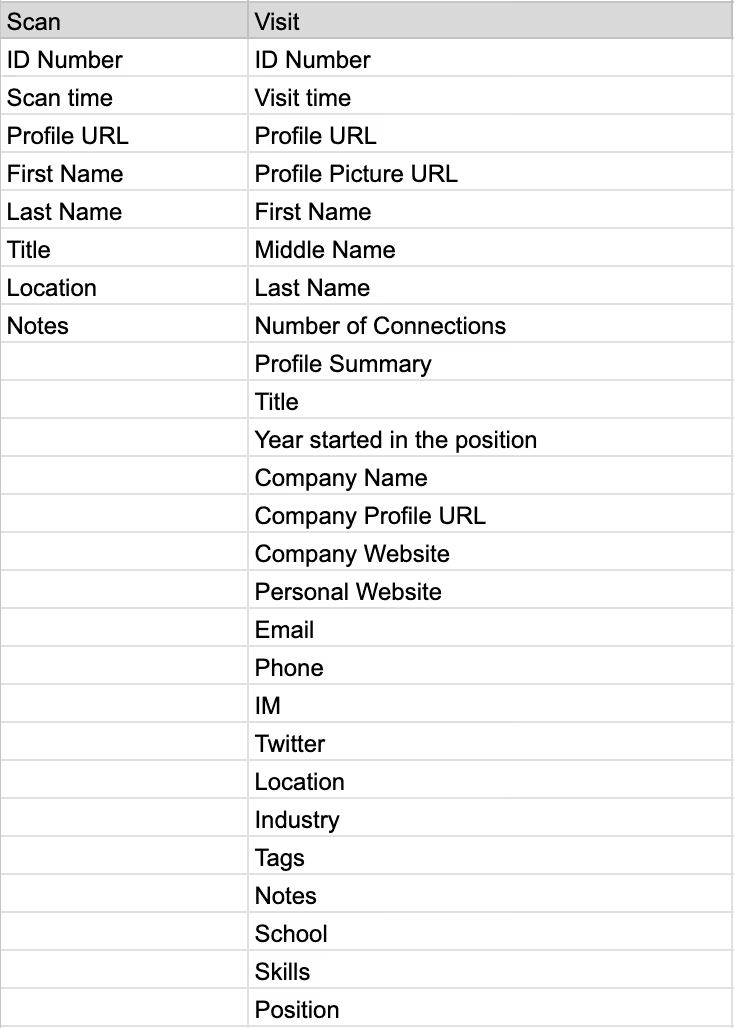
When to use Scan
When you Scan a profile, LinkedIn doesn’t notify the user like it does when you Visit a profile, so you’re working incognito.
Dux-Soup can scan 6 pages of LinkedIn profiles (that’s 60 profiles) every minute, and there are no limits to how many you can scan in a day as this is a nifty feature outside of LinkedIn. The result is that you can get a huge dataset very quickly.
Scanning a profile will gather the high-level data outlined above, which you can download and clean up, ready for enrolling into a campaign (if you have Turbo or Cloud). Or extract, enrich, and upload to your CRM system.
When to use Visit
When you visit a profile, the user will be notified that you have done so. LinkedIn limits daily profile visits, so for your account safety we set Dux-Soup to visit 250 profiles a day with a paid LinkedIn plan, and 100/day with a free plan, but you can increase these levels at your own risk.
Refer to our LinkedIn limits guide.
Visiting a profile enables Dux-Soup to extract more detailed information, like Company name, email addresses, giving you a more enriched data set which you can upload to your CRM system.
With Turbo and Cloud, you can also update your CRM system with a profile’s data when you visit it. It’s a really cost-effective way of building your database.
Read more about the differences between scanning and visiting profiles with Dux-Soup.
Before you start extracting data with Dux-Soup
In order for Dux-Soup to record profile data from LinkedIn, you need to enable this in Dux-Soup’s settings. Here’s how:
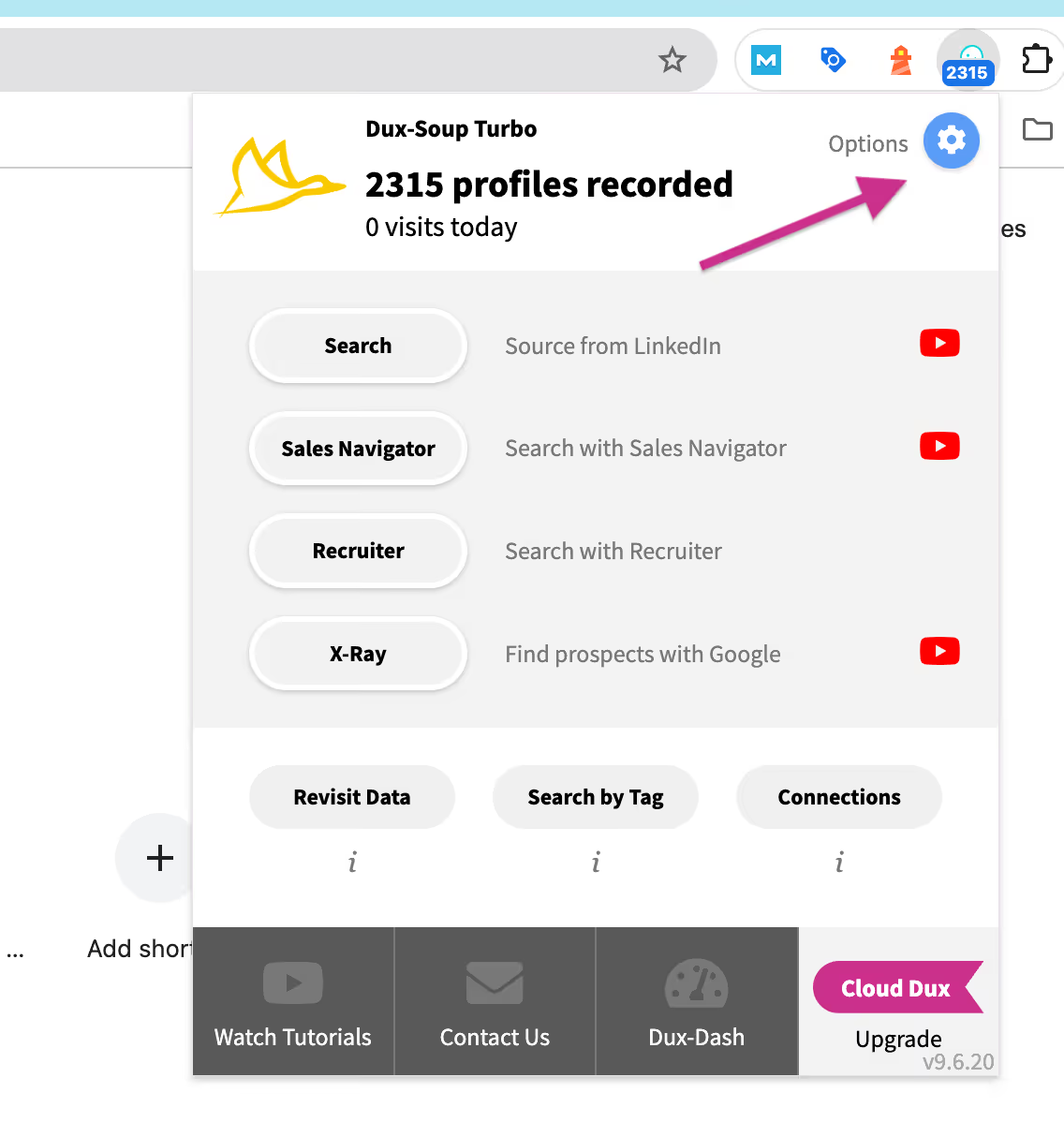
1. Start by going into Options from your Dux-Soup extension.
2. Click on the ‘User’ tab, and make sure ‘Expert’ mode is selected. Then go to the Browser tab and check the box next to ‘Record profile data’.
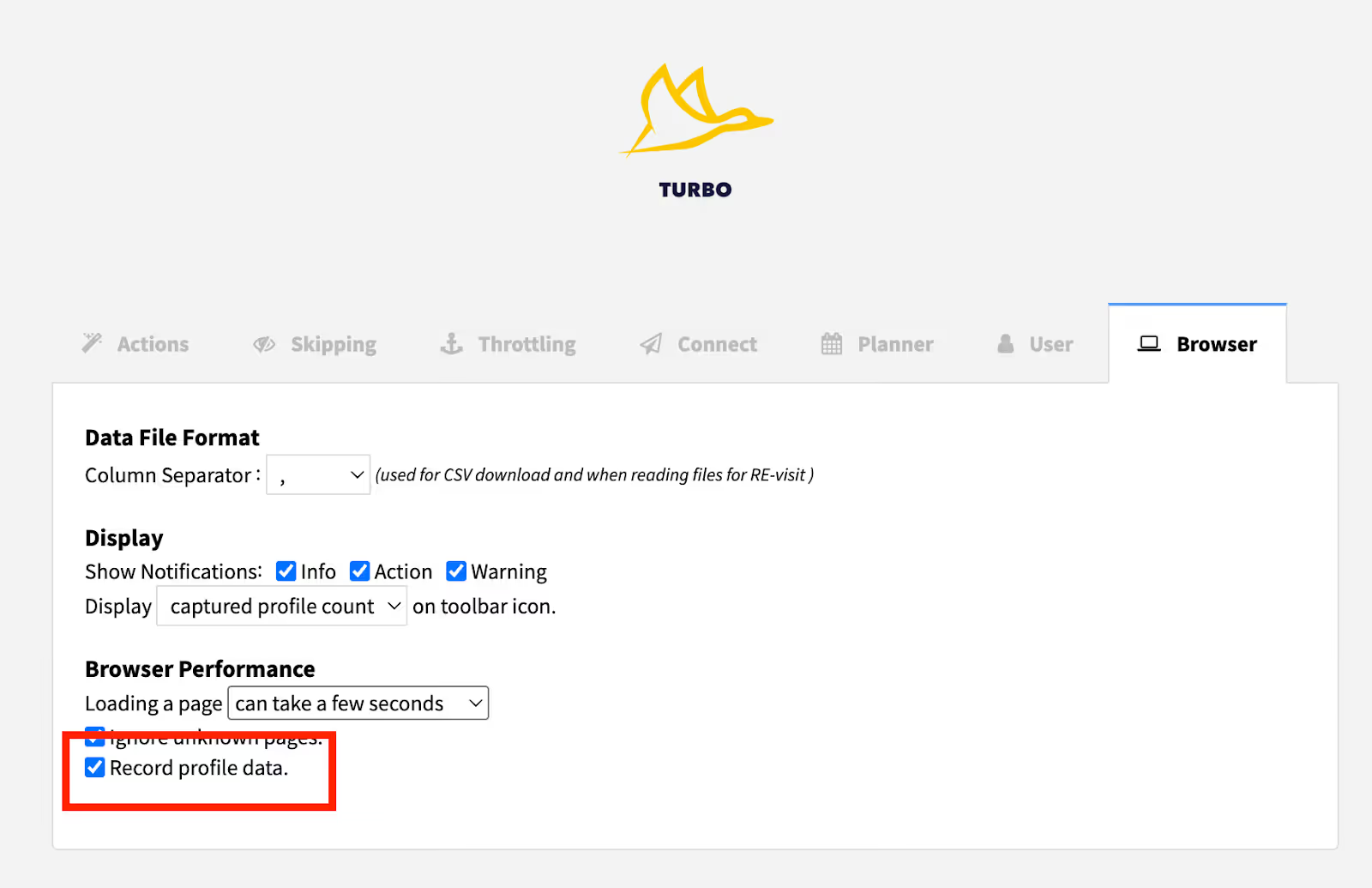
Now, whenever you visit a LinkedIn profile, Dux-Soup will record its data ready for you to download/export.
How to download your data
From the extension - with Pro / Turbo / Trial
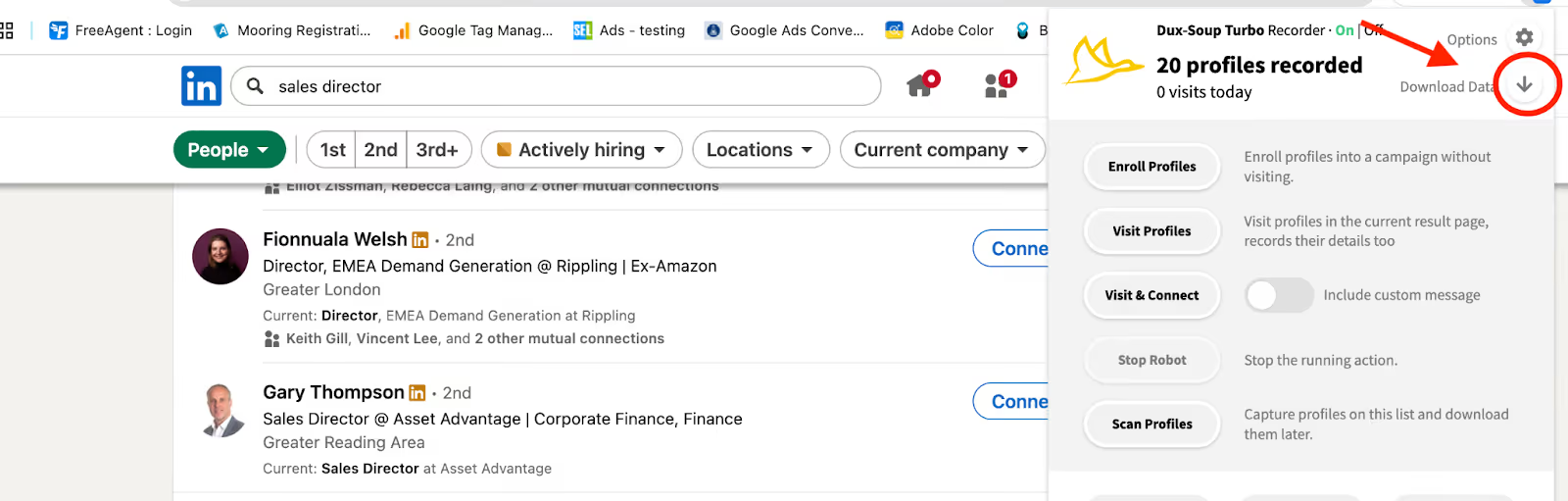
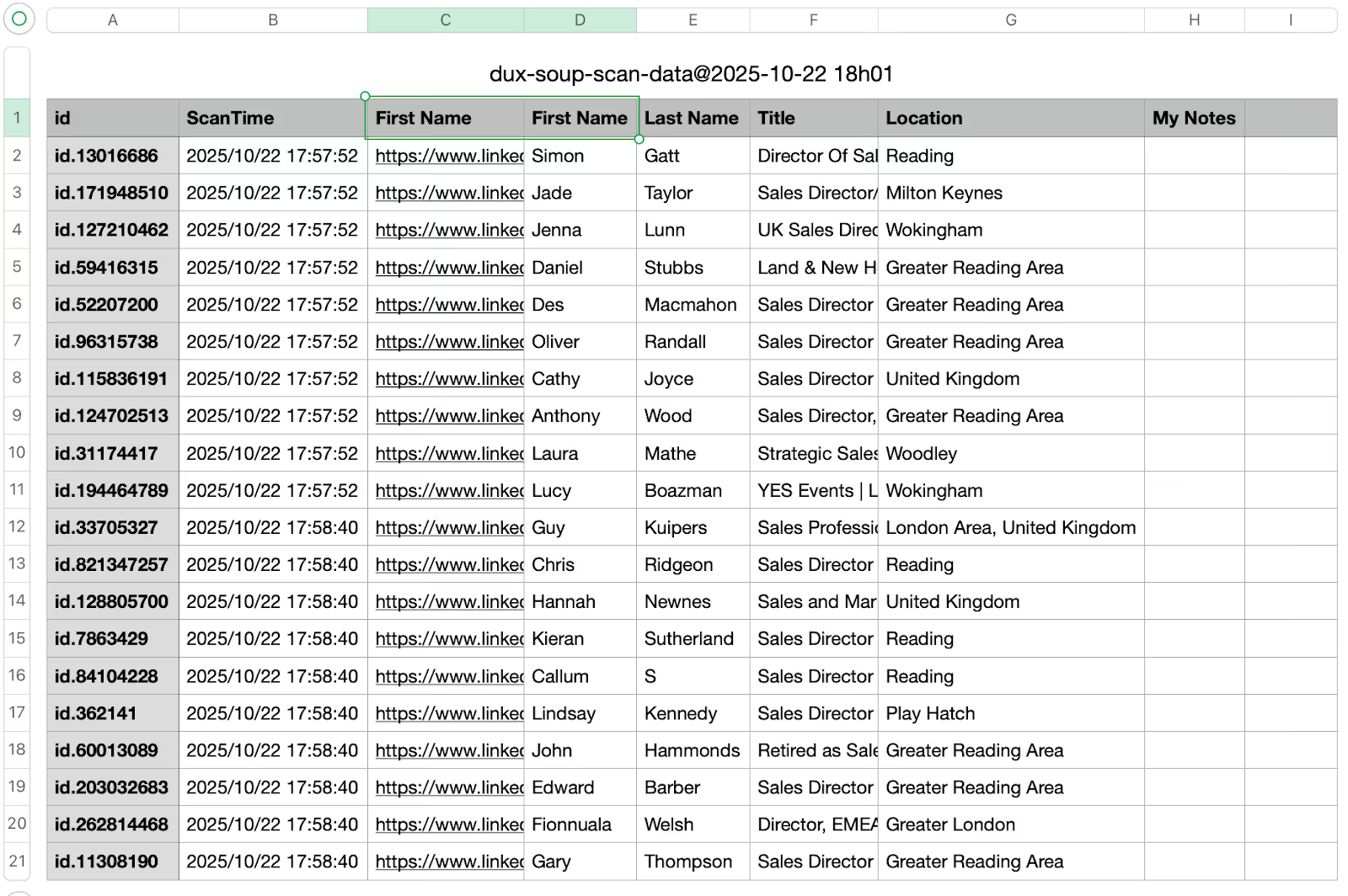
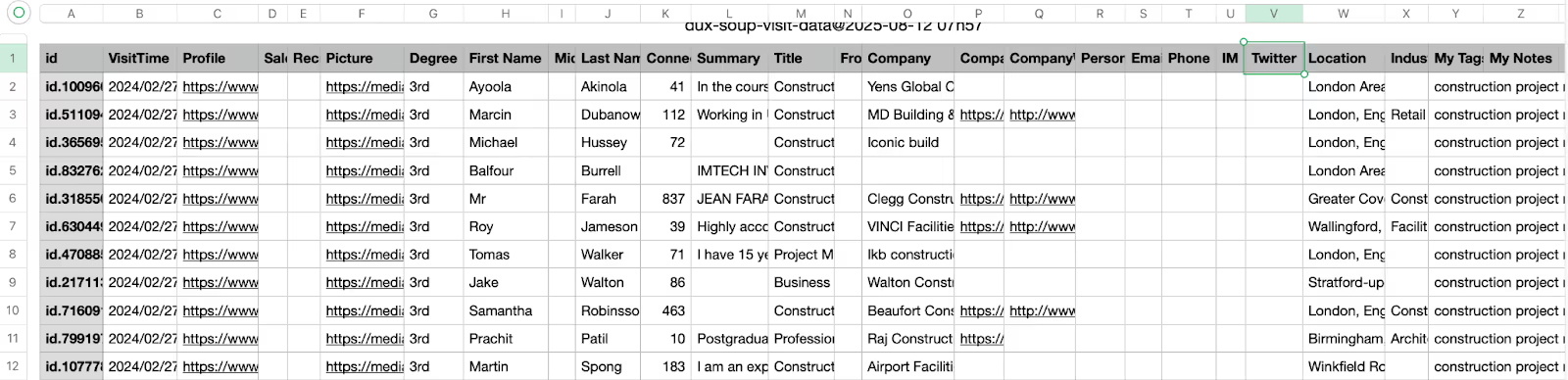
If you’re running Dux-Soup Pro, Turbo or Trial (which is a free 14-day Turbo license) then you can go to your extension and click the Download Data icon. Dux-Soup will give you the option to download your ‘Scan’ or your ‘Visit’ data.
A download of your Scan data will look like this:
And a download of your Visit data will look like this:
From the Dux-Dash with Turbo / Cloud
With Turbo and Cloud, you have a Contacts tab in the Dux-Dash. Whenever you visit a profile, it will add the profile here, and you can download your data using filters. Let’s show you:
- Go to your Contacts tab on the left-hand side of your Dux-Dash.
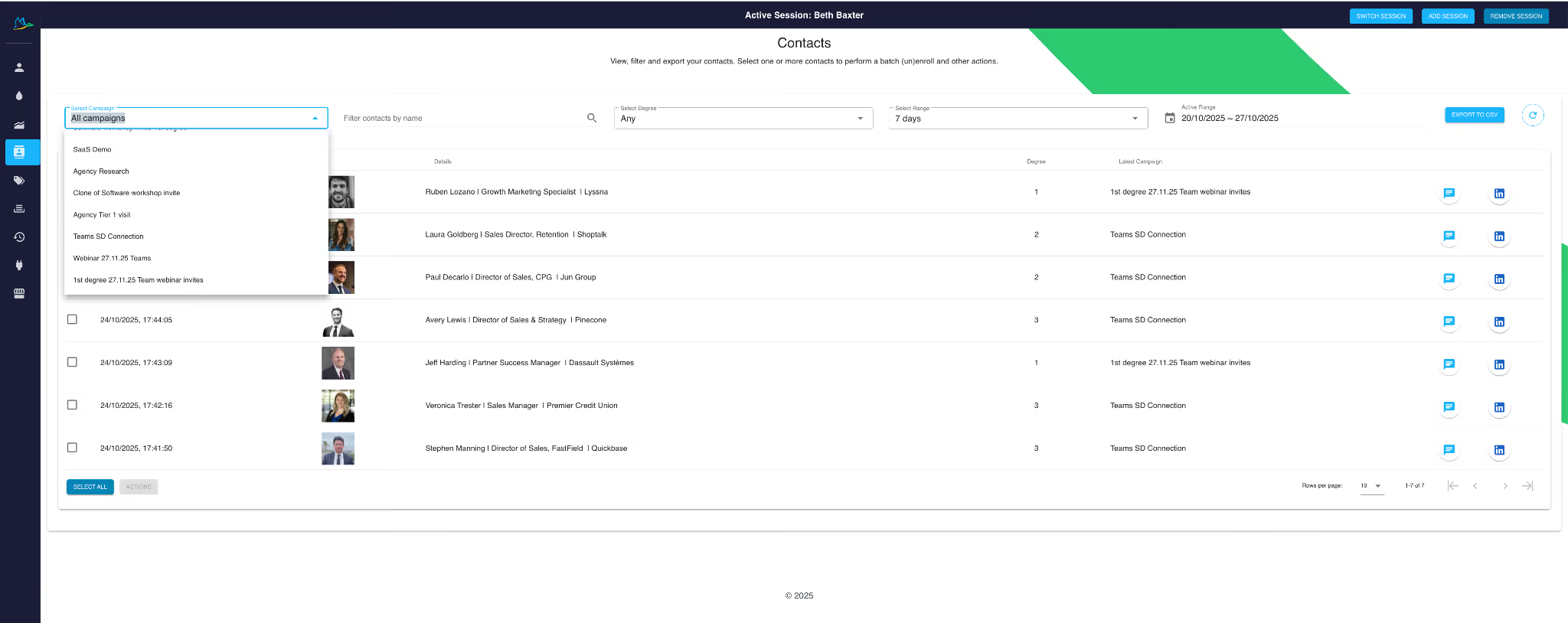
Filter by:
- Campaign
- Connection
- Date Range
You can also search for specific names.
Click the ‘Export to CSV’ button.
Export your data to Google Sheets
Because we like to make life a little easier for everyone, we also have a Google Sheets integration, which allows you to send your data straight to a Google Sheet.
You can check out how to do this in our Google Sheets integration support documentation.
Using LinkedIn data for business growth
So now we know how to extract LinkedIn data, let’s explore how we can use this data to drive business growth.
Personalize your messages with Profile Summary
Having the ability to extract a profile’s LinkedIn summary enables you to create highly personalized outreach messages. By using AI tools to incorporate key snippets of this information into your messaging, you can make your communication more relevant and engaging.
This approach is incredibly powerful right now. It demonstrates that you’ve taken the time to research the prospect and understand who they are before reaching out — helping you capture their attention and significantly boost response rates.
Recruit using Skills
If you’re a recruiter, leveraging a profile’s listed skills can help you identify candidates with the right expertise and tailor your message to highlight how their strengths align with the role’s requirements.
When reaching out to a candidate, mentioning that their top three skills directly match what your client is looking for can make your message feel more personal and authentic — increasing the likelihood of engaging someone who isn’t actively seeking a new opportunity.
Improve your engagement rates with InMails
The Contacts Tab lets you identify prospects who haven’t yet accepted your connection request. In this example, I have a Connection campaign, and by filtering for those who remain 2nd+ degree connections, I can see there are 203 prospects.
These 203 individuals won’t receive any follow-up messages until they accept my invitation. However, rather than missing an opportunity to engage, I can reach out via InMail.
By selecting these prospects and enrolling them in an InMail campaign, I can deliver my message directly to their inbox — without needing to be a 1st-degree connection first.
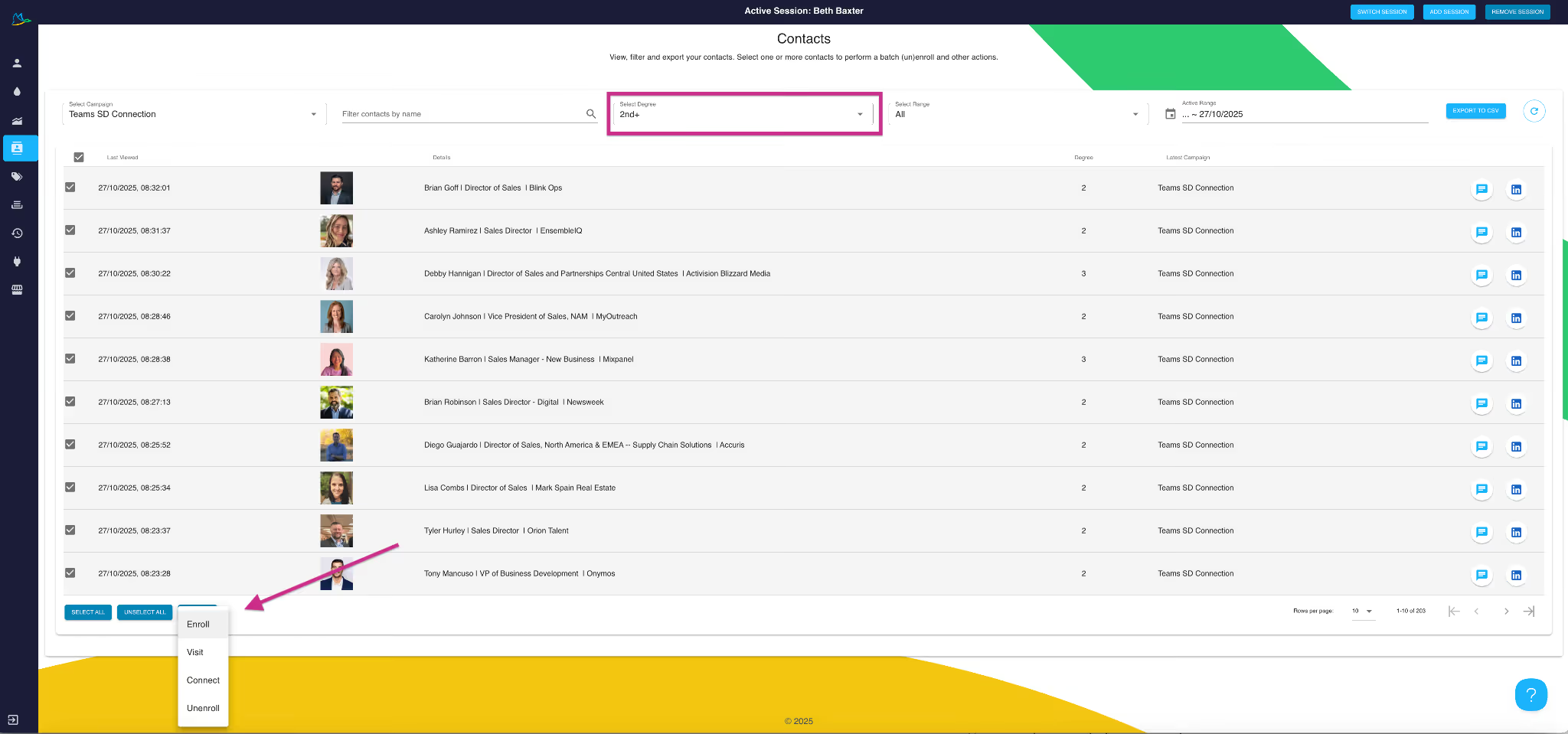
We can also export the data and enroll it in an email campaign instead.
Nurture leads by revisiting them with compelling content
Using the same approach outlined above, you can also revisit your existing campaign data and re-enroll those contacts into a new campaign — for example, to promote a webinar that’s particularly relevant to them.
By gently nurturing prospects over time, you increase the likelihood of conversion. The old adage that it takes around seven touchpoints to convert a prospect holds true - this method works especially well when taking a long-term approach with larger target companies.
Summary
LinkedIn data is a powerful source of B2B marketing intelligence waiting to be unlocked. By harnessing real-time updates, professional networks, and the verified insights that LinkedIn provides, you can transform how you segment audiences, personalize outreach, and accelerate growth.
In a digital landscape where relevance drives revenue, businesses that use LinkedIndata effectively gain a measurable edge in lead generation, sales strategy, and brand authority.
💡 Ready to uncover your hidden growth opportunities?
Start harnessing the power of LinkedIn data today using Dux-Soup to drive smarter marketing and stronger business outcomes.
Start your free Dux-Soup trial.


